
 By Marco Bösing
How to Use an Economic Calendar: Prepare Your Trading Day
Every professional trader checks the economic calendar before placing a trade. Not because every release is relevant, but because ignorance about the timing of high-volatility data is the fastest way to be caught on the wrong foot. The economic calendar is a risk management tool, not a signal generator. Properly filtered, preparation takes five minutes and prevents the most expensive mistakes.
Risk Warning: Trading futures and other leveraged products involves significant risks and can lead to the loss of your entire capital. The content of this article does not constitute investment advice. Only trade with capital you can afford to lose.
Why the Economic Calendar Is Not Optional
The economic calendar is not a nice-to-have. It is the foundation of every trading preparation. Without it, you trade blind, and blind trading costs money.
There are fundamentally two types of trading days: event days and clean days. On clean days, technical setups work as usual. On event days, market structure fundamentally changes: spreads widen, liquidity disappears, stops get cleared. Who doesn't know that CPI data is coming in three minutes and opens a long position exactly at that moment doesn't have bad luck. They have no preparation.
No institutional trading desk opens positions without checking the calendar. During my time as an institutional trader, the calendar check was the very first task in the morning, even before looking at charts. That is not a recommendation; that is standard. And this standard exists because even experienced traders lost money without calendar checks.
Who wants to understand how macroeconomic data flows through the bond market to stock indices will find the basics in Macroeconomics for Traders.
The Best Free Economic Calendars
You don't need a paid service. The best economic calendars are free.
Forex Factory is the classic among futures traders. The strength lies in the impact filter: red for high impact, orange for medium, yellow for low. Simply filter by red and you see in seconds which events affect your trading day.
Investing.com offers the best calendar for German-speaking traders. Fully translated, good mobile app, solid filtering options. The most pragmatic choice for getting started.
Trading Economics impresses with historical data. For every event, you see the prior value, consensus and actual result of past releases. Indispensable if you want to analyze typical market reactions to deviations.
TradingView integrates the calendar directly into the charting platform. Practical if you work there anyway, but less flexible in filtering than the alternatives.
The only rule: choose one calendar and use it consistently. Not three at once, not a different one every week. Consistency beats perfection.
How to Filter the Calendar Correctly
The most common mistake with economic calendars: treating all events equally. In a typical week, the calendar lists 40-60 releases. Maybe three to five of those are relevant to your trading.
For NQ and ES traders, the events that really move the market are limited:
- FOMC rate decision and press conference: the biggest single event on the calendar
- Non-Farm Payrolls (NFP): first Friday of the month, extremely volatile
- CPI and PPI: inflation data, direct influence on Fed expectations
- Retail Sales: consumer spending, shows current economic situation in real time
- ISM Manufacturing and Services: purchasing managers' indices, forward-looking economic indicators
- GDP: quarterly, rarely moves strongly (because already expected)
- PCE Price Index: the Fed's preferred inflation measure
The filtering rule is simple: Only High Impact. You can ignore medium and low impact. These events rarely move NQ more than a few points and are irrelevant for intraday traders.
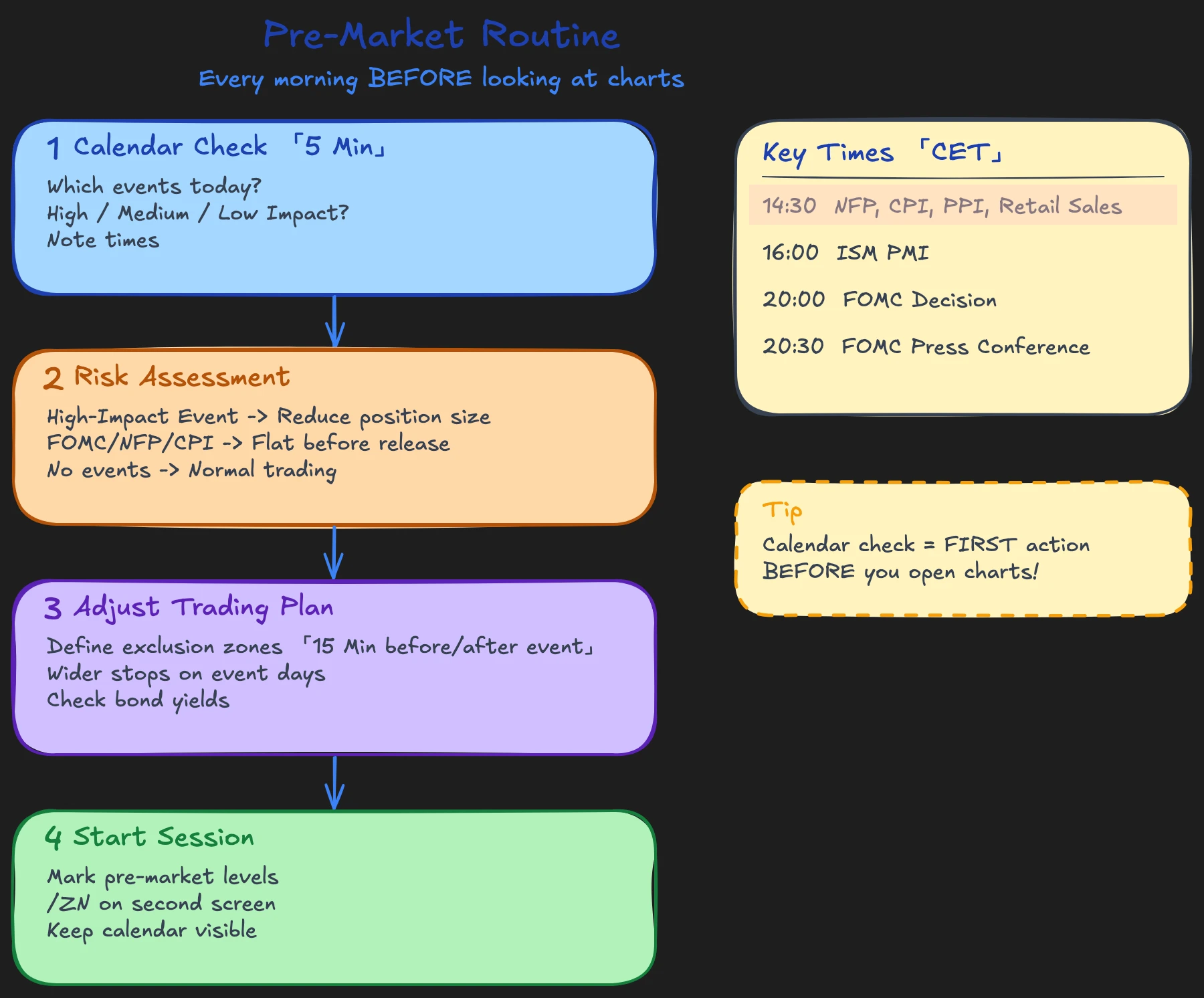
Know the exact time of every release. Most US data appears at 2:30 PM CET (8:30 AM EST), some like ISM at 4:00 PM CET (10:00 AM EST). FOMC decisions come at 8:00 PM CET (2:00 PM EST). These times are fixed and non-negotiable.
How to trade a concrete event day is shown in the article on the NFP Strategy. For ongoing macroeconomic context between events, GDP Nowcast is the better tool.
Your Pre-Market Routine with the Economic Calendar
Sunday Evening: 5 Minutes for the Week
Scan the coming week. How many high-impact events are there? Which days are clean, which are not? In a normal week, you have two to three clean days. In an FOMC or NFP week, it can be only one.
Mark the clean days. Those are your best trading days. On the other days, adjust your behavior.
Daily Before Market Open: 2 Minutes
What events are today? When exactly? What is the consensus? These three questions are enough. You don't have to be a macro economist. You only need to know whether something happens at 2:30 PM today that can destroy your trade.
The 15-Minute Rule
No new positions 15 minutes before or after a high-impact release. Not because you couldn't, but because market structure works against you in this window. Spreads are wide, liquidity is thin, fills are unreliable.
Position Size Adjustment
On days with multiple high-impact events, reduce your position size by at least 50%. That is not a sign of weakness; that is professional risk management. At my desk, before major releases, I regularly went flat or drastically reduced. If institutional traders act this way, you should too. More on systematic position sizing can be found in the article on Risk Management in Trading.
Combine the calendar check with a look at bond yields. Rising 10-year yields before a CPI day signals the market is already pricing in a hot number. Understanding this interplay separates informed traders from uninformed.
What You Should NOT Do with the Economic Calendar
Predicting data. You don't know whether CPI will come in at 3.2% or 3.5%. Nobody knows reliably. Who places a directional bet before the release is playing lottery with leverage. The economic calendar tells you when something happens, not what happens.
Treating every event equally. The German ZEW expectations index doesn't move NQ. CPI does. Not all red events are equally red. Over time, you develop a feel for which events are particularly relevant in the current market phase and which the market ignores.
Using the calendar as an excuse. If you pause on every event day, you miss 30-40% of all trading days. The calendar doesn't tell you that you shouldn't trade. It tells you when you need to adjust your behavior: smaller size, not holding through the release, wider stops. Just because an event is scheduled doesn't mean you have to pause for the entire day.
FAQ: Economic Calendar in Trading
Do I have to completely pause on days with economic data?
No. Only pause around the release window (15 minutes before and after). Before and after, you can trade normally as long as you adjust your position size. The only exception are FOMC days. On these days, market structure is often distorted all day because traders wait for the decision at 8:00 PM.
Which economic calendar is the best?
There is no objectively best calendar. Forex Factory for impact filtering, Investing.com for German-speaking users, Trading Economics for historical data, TradingView for integrated charting. Choose the one that fits your workflow and stick with it. Consistency is more important than features.
In our Macroeconomics course with 20 video lessons, you will learn how bonds, interest rates and economic data connect. Daily preparation with the economic calendar is a fixed part of the workflow. No guesses, just structure.